User Account Settings

User Account Settings

To access your user account area, please click on your user name on the upper right section of the landing page:
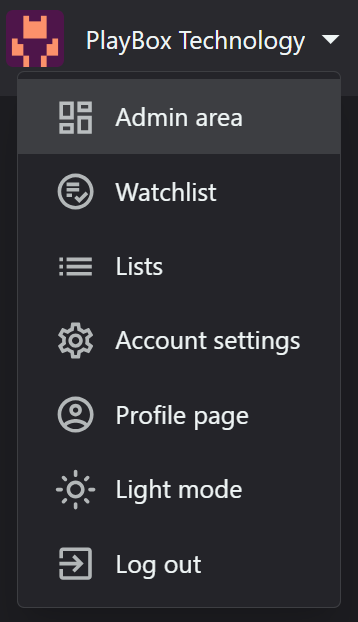

A drop down menu with the following sections will show:

Admin area: This section is for platform administrators to manage global settings. 
Watchlist: Users can save content they want to watch later. 
Lists: Allow users to create custom lists for better content organization. This feature can enhance user engagement and content discovery.
Account settings: Users can manage their personal information and preferences here. 
Profile page: This public-facing page shows user activity and preferences. 
Light/dark mode toggle: This feature enhances user experience by allowing them to choose their preferred visual mode. 
Logout option: Clearly visible logout option for security.

    • Related Articles

    • User Registration

      The user could sign up any time here: Register - OTT Stream Click Register on Upper Right Corner of the Homepage or the Join Now button in middle of the screen of the Homepage Provide a valid email address for verification: This step is crucial for ...
    • Subscriptions Settings

      This section configures gateway integration, accepted cards, invoices and other related settings from here: Settings - OTT Stream In the General subsection, you can: - Enable/disable subscription functionality: This is a crucial setting for ...
    • General Settings

      The general settings of the platform are configured here: Settings - OTT Stream Follow these steps to facilitate the process: • Set primary platform URL (domain): This is the main address users will use to access your platform. Ensure you have proper ...
    • Queue Settings

      The Queue Settings select active queue method and enter related 3rd party API keys. This includes seting up task queue method (Sync, Beanstalkd, Database, SQS, Redis): Queue systems help manage time-consuming tasks and ensure smooth user experience. ...
    • Content Settings

      The content settings are configured here: Settings - OTT Stream This section control how content is displayed across the platform and consist of 3 sub-sections: General: Here you can: - Set rating source (local user rating or TheMovieDB rating ...